
Documentation Index
Fetch the complete documentation index at: https://developer.tazapay.com/llms.txt
Use this file to discover all available pages before exploring further.
Key Characteristics
- Transfers are instant within the Tazapay network
- No fees are applied for internal transfers
- Funds are credited directly to the recipient’s holding balance
- Transfers are identified using the recipient’s deposit address
Receiving Funds via Internal Transfer
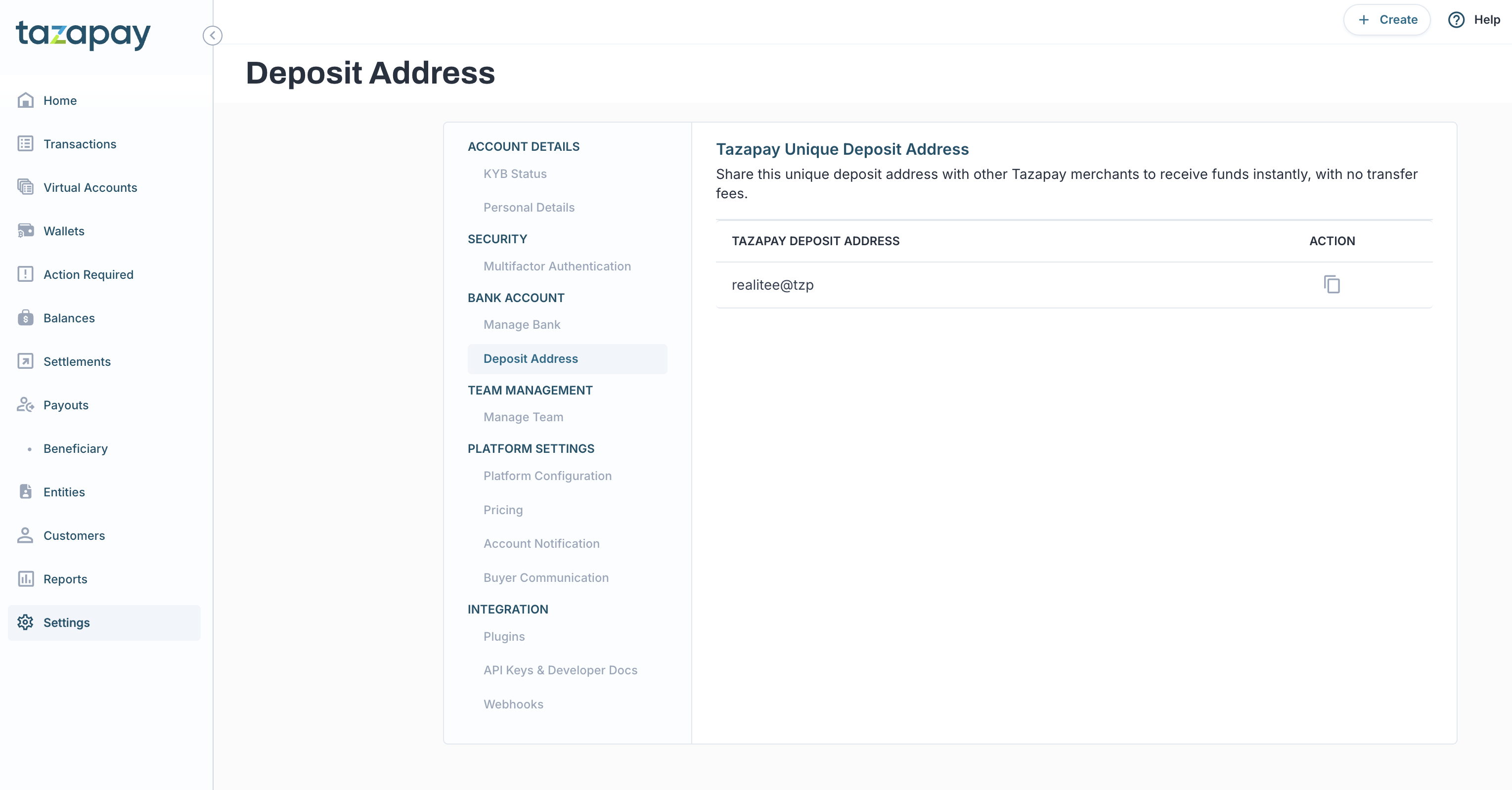
To receive funds from another Tazapay account:- Obtain your account’s unique deposit address from the Tazapay dashboard.
- Share this deposit address with the sender.
- Once the sender initiates the transfer, funds are credited instantly to your holding balance.
Sending Funds via Internal Transfer
To transfer funds to another Tazapay account:- Request the recipient’s deposit address.
- Initiate the transfer using the provided deposit address.
- Funds are debited from your holding balance and credited instantly to the recipient’s account.
Locating Your Deposit Address
You can view and copy your deposit address directly from the Tazapay dashboard.Accessing Deposit Address from Dashboard
- Log in to the Tazapay dashboard.
- Navigate to Settings from the left-hand navigation menu.
- Locate the Deposit Address section.
- Copy the deposit address to share with the sender.